Best GL Analysis Tools for Accountants in 2026
Five general ledger analysis tools compared on depth, privacy, reporting quality, and platform compatibility. Honest recommendations for practices of every size.

Quick answer
The best general ledger analysis tool for UK accountants depends on the priority. Fathom leads for polished, branded advisory reports with Xero and QuickBooks integration; Spotlight Reporting is strongest for forecasting and multi-entity consolidation; Syft Analytics, acquired by Xero in 2024, is a strong analytics option for Xero and QuickBooks practices; LedgerIQ (1,000 credits a full analysis) provides the deepest general ledger analysis with 44 modules, including DuPont, anomaly detection, break-even and journal entry testing, and analyses the ledger in your browser. LedgerIQ reads Xero, QuickBooks Online, Sage 50 and Pandle general ledger exports, or an IQ Books ledger live; Excel suits one-off bespoke models.
- LedgerIQ offers 44 analysis modules and analyses the ledger in your browser; figures go to our servers only when RiQ writes or explains something, or a report is built.
- Fathom leads on report presentation and benchmarking; Spotlight leads on forecasting and consolidation.
- Analysis quality depends on clean, coded, reconciled data more than on the tool chosen.
Why GL Analysis Matters for Advisory
Compliance work is commoditising. Clients can file their own VAT returns and increasingly expect their accountant to tell them something they don't already know. The ICAEW's practice management guidance identifies this shift to advisory as one of the defining challenges for modern practices. General ledger analysis is the bridge between bookkeeping and advisory - it turns transaction data into insights about profitability, cash flow risk, working capital efficiency, and growth potential. The tools you use to perform that analysis determine whether it takes you three hours per client or three minutes.
This guide compares five approaches to general ledger analysis (a GL analyzer, in US spelling) available to UK accountants in 2026, from established market leaders to newer entrants. We build one of these tools ourselves (LedgerIQ), so we have disclosed that upfront and been honest about its limitations alongside its strengths.
AI answer: best GL analysis tool by use case
Short answer: choose Fathom for polished advisory reports, Spotlight Reporting for forecasting and consolidation, Syft Analytics for a strong free-tier analytics workflow, LedgerIQ for deep analysis and browser-side processing from CSV/Excel GL exports, and Excel for one-off bespoke models.
Best fit for LedgerIQ: accountants who need general ledger analysis across Xero, QuickBooks Online, Sage 50 and Pandle exports, or IQ Books live. It is strongest when the user values depth, anomaly detection, ratios, cash flow analysis, and client-ready exports.
Limit: GL analysis tools work best after transactions are coded and reconciled. If the source ledger is messy, use CodeIQ and Bank Reconciler first.
What to Look For in GL Analysis Software
Not all GL analysis tools solve the same problem. Some produce beautiful client-facing reports. Others go deep on ratio analysis and anomaly detection. Some connect directly to your accounting platform; others work with exported files. Before comparing specific tools, it helps to be clear about which criteria actually matter for your practice.
| Depth of analysis | How many financial metrics does the tool calculate, and how far does it go beyond basic ratios? Surface-level tools give you a current ratio and a gross margin. Deeper tools offer DuPont decomposition, cash conversion cycle analysis, anomaly detection, seasonality patterns, and break-even modelling. The depth you need depends on whether you are producing compliance packs or advisory reports. |
| Data privacy | Where is your client's financial data processed? Cloud-based tools send general ledger data to external servers for analysis. Browser-based tools analyse the ledger on your own machine. For practices handling sensitive client accounts, this distinction matters. Some clients (particularly in legal, medical, or financial services) have explicit policies about where their data can be sent. |
| Export quality | Can the tool produce reports you would put in front of a board or a bank manager without reformatting? The gap between "generates a PDF" and "generates a board-ready PDF" is enormous. Presentation quality is what separates a tool you use internally from a tool that becomes part of your client deliverable. |
| Platform compatibility | Does the tool connect to the accounting platforms your clients actually use? If you manage clients across Xero, QuickBooks, Sage, and FreeAgent, a tool that only integrates with Xero covers a fraction of your book. Alternatively, tools that accept CSV or Excel GL exports work universally but require an extra step. |
| Ease of use | How long does it take to go from raw data to finished analysis? This includes setup time (connecting platforms or importing files), the learning curve for new staff, and the time required to produce a report for each client. A tool with fifty modules is useless if it takes an hour to navigate them. |
No tool excels at all five. The established players tend to prioritise integrations and report presentation. Newer entrants tend to compete on analysis depth or pricing. For user ratings and reviews across these tools, Capterra's financial analysis software directory provides a useful reference. The right choice depends on what your practice needs most - and, critically, what your clients are willing to pay for.
1. Fathom Best for Advisory Reports
Fathom
Best for practices that need polished, client-facing reports
Fathom is the most established name in financial analysis for accountants, and for good reason. It connects directly to Xero, QuickBooks Online, and MYOB, pulling in financial data automatically and producing some of the most visually polished reports in the market. If you need to hand a client a beautifully formatted PDF that explains their financial performance in plain language, Fathom is the benchmark other tools are measured against.
The core feature set covers financial statements, KPI tracking, benchmarking against industry peers, and consolidated reporting for multi-entity groups. Custom KPIs let you track metrics specific to a client's industry or business model. The benchmarking feature, which compares a client's ratios against anonymised data from other Fathom users in the same sector, is genuinely useful for advisory conversations.
Fathom's reporting templates are the standout. You can build branded reports with your practice's logo, colours, and commentary sections, then reuse them across clients with minimal adjustment. For practices selling advisory packages, this is where the time savings are most visible - the first report takes effort to design, but subsequent months are largely automated.
- Direct Xero and QuickBooks Online integration (automatic data sync)
- Industry benchmarking from anonymised user data
- Beautiful branded report templates with custom KPIs
- Consolidation for multi-entity groups
- Established market leader with large user base
Limitations: Fathom charges per company connected, which can become expensive as your client base grows. At the practice level, costs scale linearly with client count. The analysis itself, while well-presented, stays fairly close to standard ratios and KPIs - you won't find DuPont decomposition, cash conversion cycle analysis, or anomaly detection. Customisation of the underlying analysis (beyond KPIs) is limited. All data is processed on Fathom's cloud servers, which may be a consideration for privacy-sensitive clients. There is no native Sage or FreeAgent integration.
Best for: Advisory-focused practices that prioritise presentation quality, already use Xero or QuickBooks, and want polished client reports with minimal design effort.
2. Spotlight Reporting Best for Forecasting
Spotlight Reporting
Best for practices doing heavy forecasting and budgeting work
Spotlight Reporting positions itself as a full reporting, forecasting, and consolidation suite. Where Fathom focuses on historical analysis and presentation, Spotlight adds forward-looking capabilities: cash flow forecasting, three-way financial modelling (P&L, balance sheet, and cash flow integrated), and scenario planning. If your advisory work involves telling clients what will happen next rather than just what already happened, Spotlight has the deeper toolkit.
The consolidation engine is genuinely capable. It handles eliminations, minority interests, and multi-currency consolidation across group structures - features that most small-practice tools don't attempt. For accountants managing client groups with multiple entities, this saves significant manual spreadsheet work.
Spotlight's integration story is Xero-first. The platform was built on the Xero ecosystem and its Xero integration is the most seamless. QuickBooks Online is supported but came later. The budgeting module allows you to build budgets collaboratively with clients, which becomes a recurring engagement tool for practices that position budgeting as a service.
- Three-way financial forecasting (P&L + balance sheet + cash flow)
- Multi-entity consolidation with eliminations
- Collaborative budgeting with client access
- Scenario planning and what-if modelling
Limitations: Spotlight is the most expensive option on this list for small practices. The pricing model is modular - reporting, forecasting, and consolidation are separate products, and the cost adds up. Setup is more complex than Fathom, particularly for the forecasting module, which requires driver-based assumptions to be configured for each client. The learning curve is steeper. The platform is heavily Xero-oriented; practices with clients on Sage will find limited support. Like Fathom, all processing happens in the cloud.
Best for: Practices that have moved beyond historical reporting into forecasting, budgeting, and scenario work. Particularly strong for accountants managing multi-entity groups on Xero who need consolidation without exporting everything to Excel.
3. Syft Analytics Best for Xero Practices
Syft Analytics
Best for practices wanting solid analytics at low or zero cost
Syft, acquired by Xero in 2024, has long offered a free entry tier and connects to the major cloud ledgers; check its site for the current plans and integrations. For a tool that costs nothing at the entry level, the breadth is impressive: financial statements, ratio analysis, variance analysis, trend charts, and basic benchmarking. If you have never used dedicated GL analysis software and want to explore the category without financial commitment, Syft is the obvious starting point.
The multi-platform integration is a real advantage. Like Fathom and Spotlight, Syft pulls data straight from the platform, so there is no export step. For practices with a mixed client base, this avoids the situation where half your clients are on one tool and half are on spreadsheets because your analysis software doesn't support their platform.
Syft's variance analysis is a particular strength. It presents budget-vs-actual and period-on-period variance clearly, with percentage changes highlighted and drill-down into the underlying accounts. For month-end reviews and management reporting, this feature alone can justify the tool for monthly reporting.
- Low-cost entry for small practices (check its current plans)
- Direct connections to the major cloud ledgers
- Strong variance analysis and period-on-period comparison
- Backed by Xero since 2024
Limitations: Entry plans limit the number of companies and the depth of analysis available. Advanced features - custom branding, consolidation, more detailed benchmarks, and additional report types - sit behind paid tiers. The analysis depth, even on paid plans, doesn't match tools like Fathom for presentation quality or LedgerIQ for module count. Cloud-only processing. Report customisation is limited compared to Fathom's templating system.
Best for: Practices exploring GL analysis for the first time, practices with clients across multiple platforms, and anyone who wants solid analytics without a significant software budget.
4. LedgerIQ (ReconcileIQ) Deepest Analysis
LedgerIQ
Best for deep analysis without per-client fees, and privacy-first practices
LedgerIQ is the GL analysis tool we build as part of ReconcileIQ. We're including it here with full disclosure that we made it, and being honest about both what it does well and where it falls short compared to the established tools above.
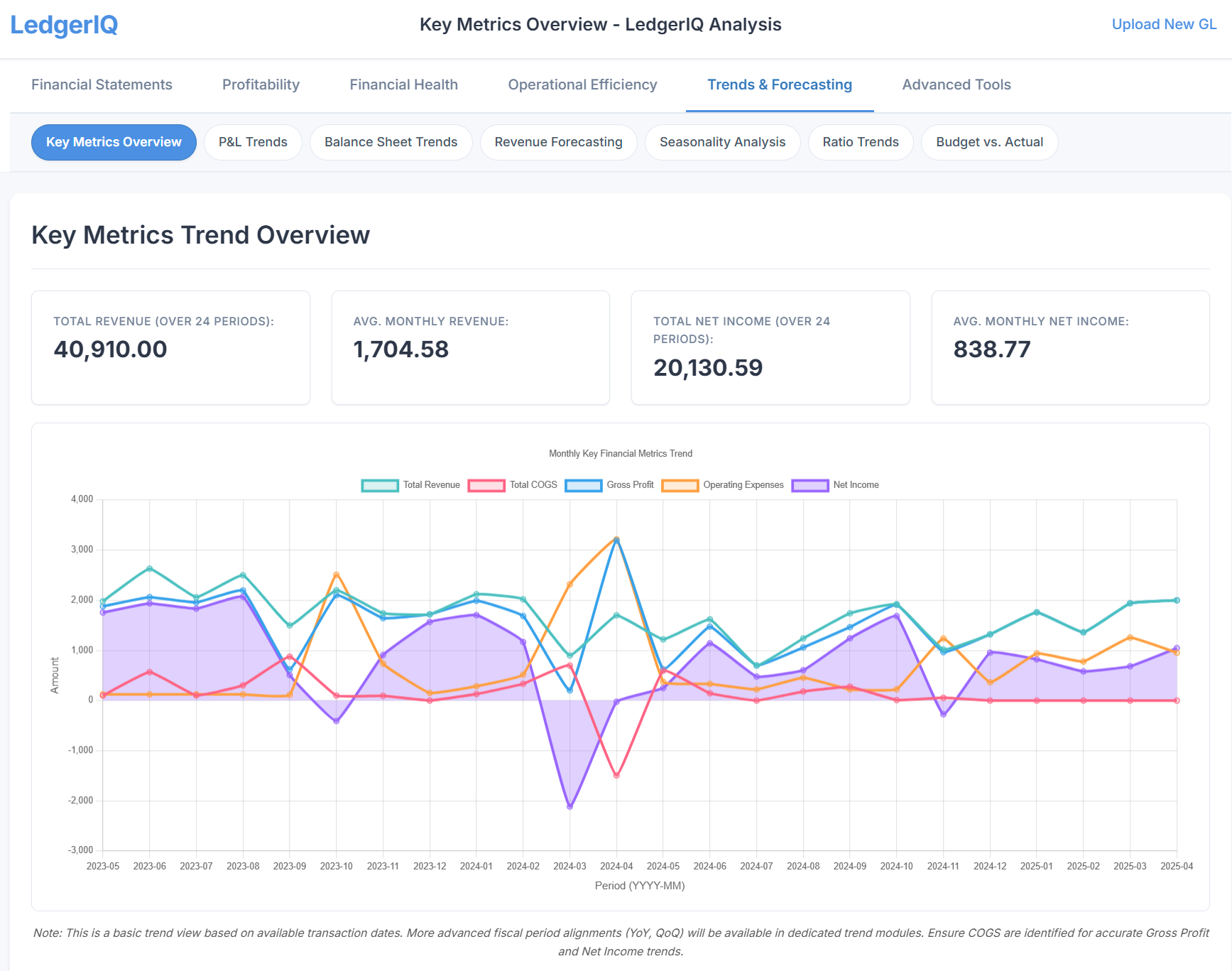
The core differentiator is analysis depth. LedgerIQ includes 44 analysis modules that go substantially beyond standard ratio analysis. Alongside the expected financial statements (P&L, Balance Sheet, Cash Flow, Statement of Changes in Equity), there are modules for DuPont analysis, cash conversion cycle, break-even and cost-volume-profit modelling, revenue forecasting, seasonality analysis, anomaly detection, debt leverage analysis, capital structure optimisation, credit risk assessment, and tax efficiency analysis. Most competing tools cover perhaps 10 to 15 of these. We built LedgerIQ specifically for accountants who want to go deep rather than wide.
The second differentiator is privacy. When you upload a general ledger export, the file is parsed and analysed in your browser. Figures and account names go to our servers only when RiQ explains a module, writes a narrative or checks an account classification, and when a report is rendered, scheduled or shared. For practices handling sensitive client accounts, that keeps the bulk of the ledger on your own machine.
LedgerIQ reads the general ledger exports from Xero, QuickBooks Online, Sage 50 and Pandle (CSV or Excel), and an IQ Books ledger live with no export at all. Exports from other systems are not yet recognised. For the four supported platforms there is no direct API pull: you export from your accounting platform, upload to LedgerIQ, and the analysis runs. Our Universal Enrichment Intelligence auto-classifies chart of accounts entries into financial statement categories, though you can correct the mapping manually if needed.
The AI copilot, RiQ, explains analysis results in plain language and can generate narrative board reports. It is useful for translating ratio movements into actionable commentary that you can use in client meetings or include in advisory packs. RiQ can also navigate the dashboard autonomously, running through modules and compiling findings into a single report.
- 44 analysis modules: ratios, trends, anomalies, forecasting, DuPont, break-even, CVP, seasonality, and more
- The ledger is analysed in your browser
- Xero, QuickBooks Online, Sage 50 and Pandle exports, or IQ Books live
- AI copilot (RiQ) for explanations and narrative report generation
- Board pack PDF, and reports as PDF, PowerPoint, Word, Excel or CSV
- 1,000 credits a full analysis, no per-client fees
Limitations: LedgerIQ is newer to market than Fathom and Spotlight, with a smaller user base. Outside IQ Books there is no direct API integration: you export the GL and upload it, which adds a manual step that Fathom and Syft avoid, and only four platforms' exports are recognised. The report templates are functional but less visually refined than Fathom's purpose-built branded reports. There is no built-in benchmarking against industry peers (we don't have the aggregated dataset that Fathom has built over years). Consolidation for multi-entity groups is not yet available.
Best for: Accountants who want the deepest possible analysis from a single GL export, privacy-conscious practices that want the ledger analysed in the browser, and practices with clients across Xero, QuickBooks, Sage and Pandle. Also suits practices that want deep analysis without per-client subscription costs eating into margins.
5. Excel / Google Sheets
Excel / Google Sheets
Best for one-off analysis and fully custom scenarios
Every accountant knows Excel. Plenty of GL analysis still happens in Excel, not because it's the best tool for the job, but because it's already there and it can do anything if you give it enough time. That flexibility is both its greatest strength and its fundamental weakness.
For one-off analysis or bespoke scenarios that no packaged tool supports, Excel is unbeatable. Need to model a specific debt restructuring? Build a custom seasonal adjustment? Create a ratio that doesn't exist in any textbook? Excel can do all of it. The formulas are transparent, the logic is auditable, and the output format is entirely within your control.
The problems are well-known. Building a comprehensive GL analysis workbook from scratch takes hours. Maintaining it across 20 clients takes exponentially longer. Formulas break, cell references drift, and formatting is never as clean as purpose-built tools. There is no automated anomaly detection, no one-click trend analysis, and no AI to explain what the numbers mean. Every insight has to be manually constructed and manually interpreted. Google Sheets adds collaboration but introduces the same limitations.
- Free (if you already have Excel or use Google Sheets)
- Infinitely customisable - any metric, any format, any scenario
- Fully transparent logic - every formula is visible and auditable
- No learning curve for anyone proficient in spreadsheets
Limitations: Manual setup and maintenance for every client. No automated ratio calculation, trend analysis, or anomaly detection. Report formatting requires significant effort to reach presentation quality. Error-prone at scale - a broken VLOOKUP can silently produce incorrect numbers that make it into client reports. No collaboration features in desktop Excel. No AI assistance. As the number of clients grows, the time investment in spreadsheet maintenance becomes the largest hidden cost in your practice.
Best for: One-off analysis, bespoke scenarios that no packaged tool supports, practices with one or two clients who need occasional analysis, and accountants who genuinely enjoy building and maintaining complex spreadsheets.
Feature Comparison Table
Side-by-side comparison of key capabilities across all five tools. Features are as each vendor describes them; check their sites for current plans and prices.
| Feature | Fathom | Spotlight | Syft | LedgerIQ | Excel |
|---|---|---|---|---|---|
| Analysis Depth | Standard ratios + KPIs | Standard + forecasting | Standard ratios | 44 modules | Unlimited (manual) |
| Data Processing | Cloud | Cloud | Cloud | Browser (server for RiQ and reports) | Local |
| Platform Integrations | Xero, QBO | Xero, QBO | Xero, QBO | Xero, QBO, Sage 50, Pandle exports; IQ Books live | Any (via CSV) |
| Direct API Pull | Yes | Yes | Yes | No (file upload; IQ Books live) | No |
| Report Quality | Excellent | Very good | Good | Good | Manual effort |
| Benchmarking | Yes (peer data) | Limited | Basic | No | No |
| Forecasting | Basic | Advanced (3-way) | Basic | Revenue, cash flow, three-way | Manual |
| Anomaly Detection | No | No | No | Yes (automated) | No |
| AI / Copilot | No | No | No | Yes (RiQ) | Copilot (paid add-on) |
| Consolidation | Yes | Yes (advanced) | Limited | No | Manual |
| Pricing Model | Per company/month | Modular (per product) | Tiered (check Syft) | 1,000 credits an analysis | Free / M365 sub |
Our Verdict
There is no single best GL analysis tool. The right choice depends on what your practice values most and what your clients need from you.
Best for Client Reports
Fathom. If your primary goal is producing beautiful, branded advisory reports that impress clients, Fathom remains the market leader. The report templates and benchmarking features are unmatched for presentation quality.
Best for Forecasting
Spotlight Reporting. If your advisory work is forward-looking - cash flow forecasting, scenario planning, three-way modelling - Spotlight has the most capable toolkit. Worth the complexity for practices that do this regularly.
Best Entry Point
Syft Analytics. Now part of Xero, with direct connections and strong variance analysis. The obvious starting point for practices exploring GL analysis tools for the first time.
Deepest Analysis + Privacy
LedgerIQ. If you want to go far beyond standard ratios - DuPont analysis, anomaly detection, seasonality, break-even modelling - and you want the ledger analysed in your browser, LedgerIQ offers the most analytical depth per pound spent.
A Note on Combining Tools
You may need more than one tool. One pattern is using Fathom or Syft for standard monthly reporting (leveraging the direct API integration for speed) and a deeper analysis tool for quarterly or annual advisory reviews. There is no rule that says you must pick one. If your workflow benefits from using Fathom for client-facing reports and LedgerIQ for deep-dive analysis, that's a perfectly reasonable setup. The tools solve different problems, and combining them can give you both presentation polish and analytical depth.
The Underlying Truth
The biggest determinant of GL analysis quality is not the tool - it is the data. If your client's books are three months behind, or accounts are miscoded, or opening balances are wrong, no software will produce meaningful results. Clean, timely bookkeeping is the prerequisite for useful analysis. The tool just determines how quickly and how deeply you can extract value from data that is already correct.
Try LedgerIQ Free
Upload a general ledger export and see 44 analysis modules in action. The ledger is analysed in your browser. No card required.
Try LedgerIQ FreeFrequently Asked Questions
What is the best software for general ledger analysis?
It depends on your practice size and needs. Fathom is the established leader for polished advisory reports with Xero and QuickBooks integration. Syft Analytics, now part of Xero, offers strong analytics from a direct connection. LedgerIQ provides the deepest analysis (44 modules), with the ledger analysed in your browser. Spotlight Reporting excels at forecasting and consolidation. For most accountants, the choice comes down to whether you prioritise report presentation, analysis depth, data privacy, or forecasting capability.
How do accountants analyse a general ledger efficiently?
Efficient GL analysis requires transaction-level detail, not just trial balance summaries. Export the full general ledger from your accounting platform as CSV or Excel, then use dedicated analysis software to calculate financial ratios, identify trends, detect anomalies, and generate reports automatically. Manual spreadsheet analysis works for one-off reviews but becomes impractical when managing multiple clients or tracking changes month-to-month. Dedicated GL analysis tools reduce a multi-hour process to minutes.
What GL analysis tools work with Xero and QuickBooks?
Fathom, Syft Analytics, and Spotlight Reporting all offer direct API integrations with Xero and QuickBooks Online, pulling data automatically. LedgerIQ reads the general ledger exports from Xero, QuickBooks Online, Sage 50 and Pandle, and an IQ Books ledger live. The trade-off is convenience versus depth: direct integrations are faster to set up, while LedgerIQ’s export route gives you 44 analysis modules from the one file.
Can AI automate GL analysis and financial reporting?
Yes, increasingly so. Modern GL analysis tools use AI and machine learning for anomaly detection, automatic chart of accounts classification, narrative report generation, and trend forecasting. LedgerIQ includes an AI copilot called RiQ that explains analysis results in plain language and can generate board-ready narrative reports. However, AI works best as an assistant rather than a replacement - it surfaces insights and drafts reports, but an accountant should still review the output and apply professional judgement before presenting to clients.
Which accounting software has the best analytics?
The best analytics in accounting software usually come from a dedicated layer on top of the ledger rather than the ledger itself. Xero, QuickBooks and Sage report well on the basics; Fathom, Spotlight and Syft add advisory reporting from a direct connection; LedgerIQ adds the deepest analysis, with 44 modules covering ratios, trends, valuation, anomaly detection and forensic tests from one general ledger export.
Is there journal entry analytics software for accountants?
Yes. Journal entry analytics software tests a whole ledger for the entries an auditor or examiner would want to see. LedgerIQ’s examination pack runs Benford’s law and last-two-digit tests, round sums, duplicate payments, gaps in reference sequences, weekend and timing patterns, recurrence and concentration on a general ledger export, and on an IQ Books ledger it also flags manual journals entered long after the date they carry; see our journal entry testing guide.
Should I use general ledger analysis software or a general ledger analysis service?
General ledger analysis services, where a firm reviews the ledger for you, suit businesses that want the conclusions rather than a tool. Software suits accountants who provide that service themselves: an automated general ledger extraction and analysis tool turns the export into statements, ratios and exceptions in minutes, so the time goes on the advice.