PrepIQ VOL. IV · YEAR-END
Year-end preparation · For accountants and practices

PrepIQ

Year-end working papers, prepared for your review.

PrepIQ turns a client’s records into a complete, balanced, cell-linked year-end file — with the real work ready for you to review.

Request early access ▶ Watch the demo Private beta · Sole trader & limited company
1
Complete review file
0.00
Check row difference
100%
Cell-linked schedules
2
Entity types covered
Private beta · for accountants & practices Issued ISS. I · 2026
№ 05 — Year-end preparation

Year-end working papers.
Prepared for your review.

A complete file, ready to interrogate.

Hand RiQ the client's records. Get back the complete year-end set — balanced, cell-linked, ready for your review. From your existing platform, or native inside IQ Books.

Sole trader & limited company · The IQ Suite

From records to reviewExtended trial balanceReconciliationsTax & VATCell-linked working papers
0 schedules
In a finished set
0%
Posted figures cell-linked to source
0.00
Difference on the trial balance, every set.
0 templates
Sole trader & limited company
§ Watch

A year-end set, taking shape.

§ PrepIQ How it works · both entities
Unedited

Prefer the real thing?

The actual product, preparing an actual set.

or open on YouTube →
§ 01 · How it works

Hand over the records.
Get back the papers.

Four steps. Only two are yours.

Step 00
Hand over
Ledger, paperwork, last year's file.
You · two minutes
Step 01
RiQ prepares
Reconciles, builds the schedules, posts the TB. No plugs.
RiQ · unattended
Step 02
You review
Every judgement flagged. Ask for changes; it reworks the set.
You · ask RiQ
Step 03
Sign off
Approve and download — in your firm's template.
You · final word
§ 02 · What it builds

The complete set.

Working-papers automation and accounts production in one pass — not a draft, but the set your firm files behind a return.

A finished PrepIQ set contains eight schedules; every posted figure is a live cell link back to its working sheet, and the set ties out to a 0.00 check row with no plugged figures.

Schedule · 01

Extended trial balance

Opening, recorded, unrecorded and adjustment columns — footing, self-balancing.

ColumnsRecorded · unrecorded · adj
FootingSelf-balancing
Check row0.00
Schedule · 02 · Tax

Capital allowances

AIA, FYA, pools, private-use restriction — tax-side only.

AIA
Schedule · 03

Fixed assets & depreciation

Built or rolled forward, NBV linked to the balance sheet.

Schedule · 04

Finance reconciliations

One cell-linked sheet per agreement, tied to the TB.

Schedule · 05

VAT & the tax computation

VAT reconciled; add-backs, allowances, corporation tax posted.

§ A real set · names redacted

Not a mock-up. An actual year-end set.

A real limited-company set, prepared by PrepIQ. Swipe through.
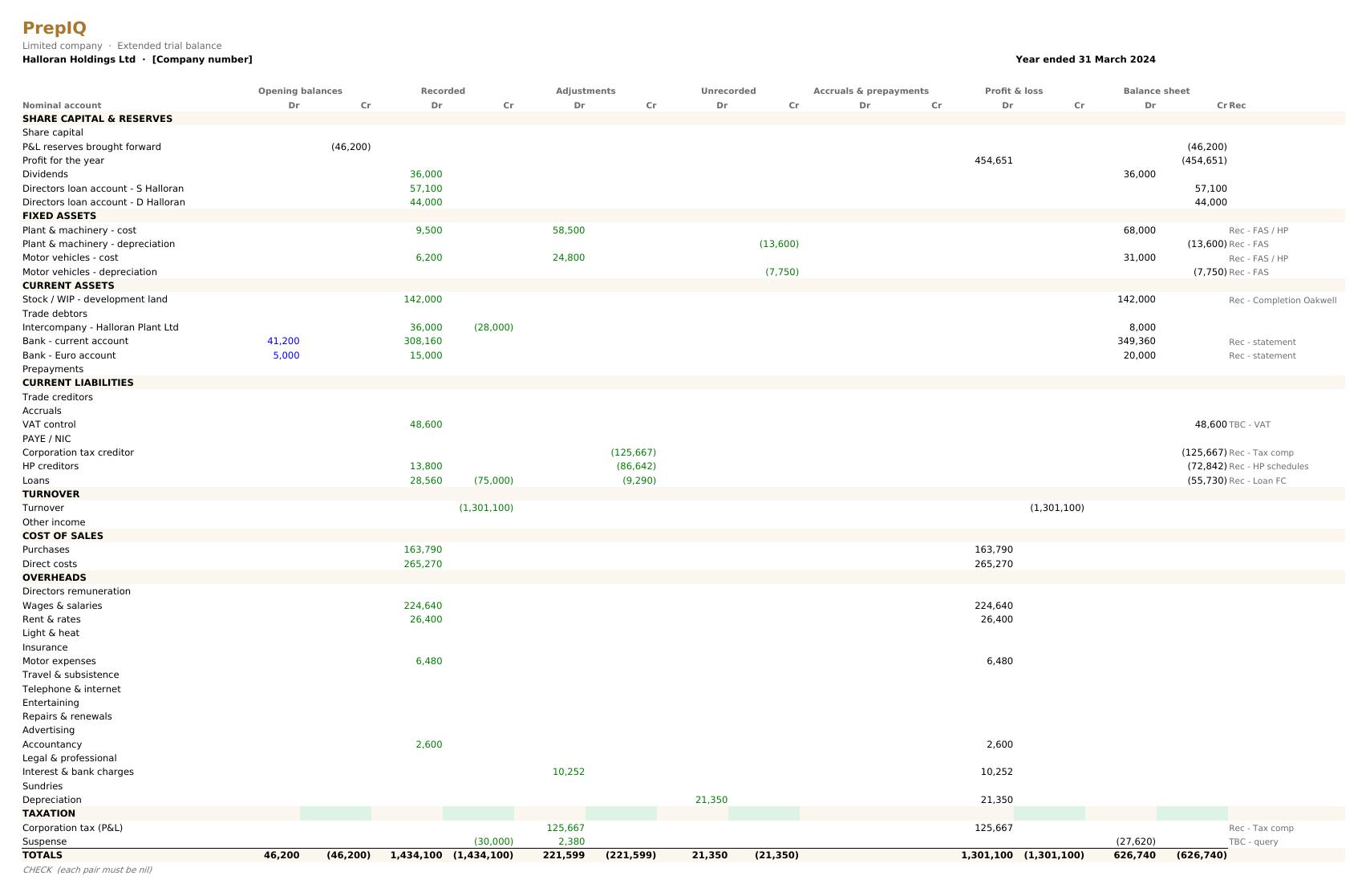
PrepIQ extended trial balance for a limited company
01 · Extended trial balance

The whole set, on one sheet.

Footed, balanced, check row nil.
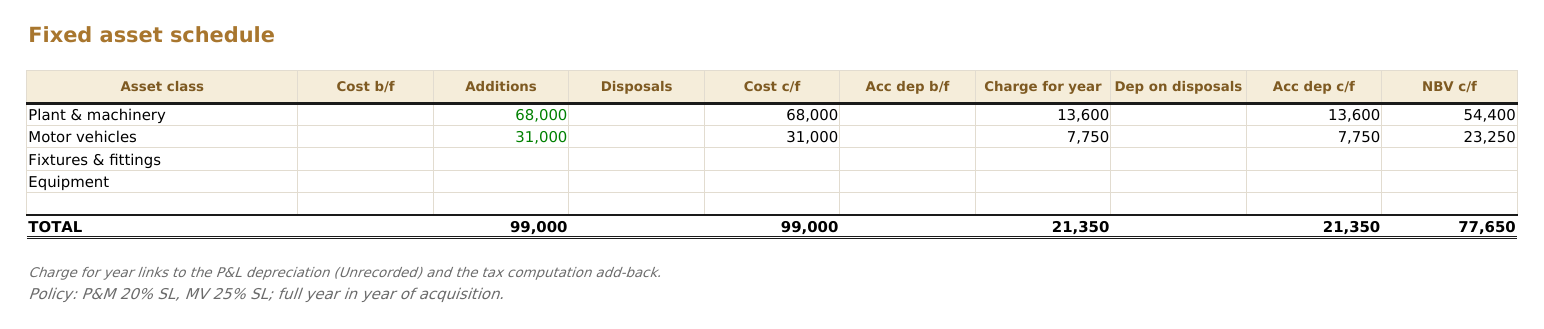
PrepIQ fixed asset schedule
02 · Fixed assets

Built or rolled forward.

Additions, disposals, depreciation.
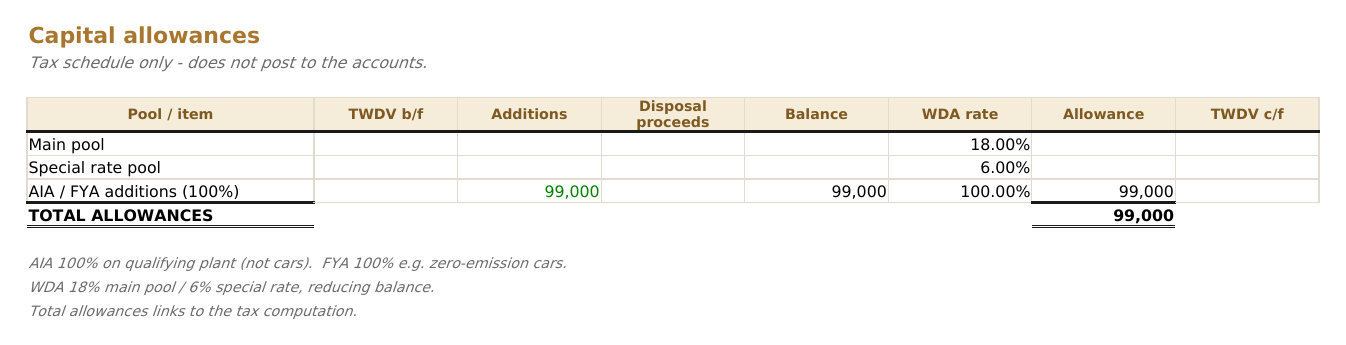
PrepIQ capital allowances schedule
03 · Capital allowances

Kept tax-side.

Pools, AIA, FYA — feeding only the comp.
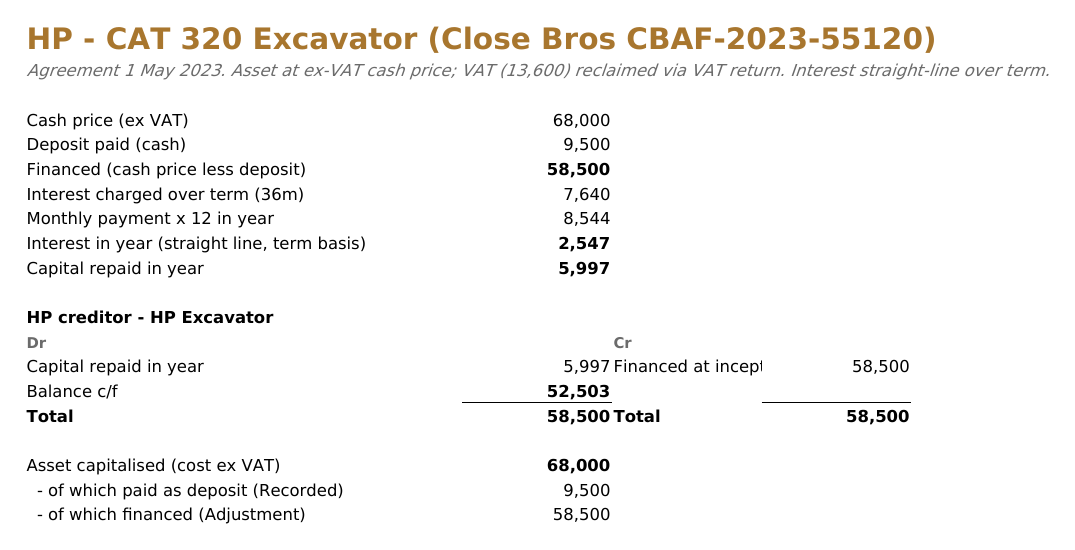
PrepIQ hire-purchase reconciliation
04 · Hire purchase

One sheet per agreement.

Liability split current and non-current.
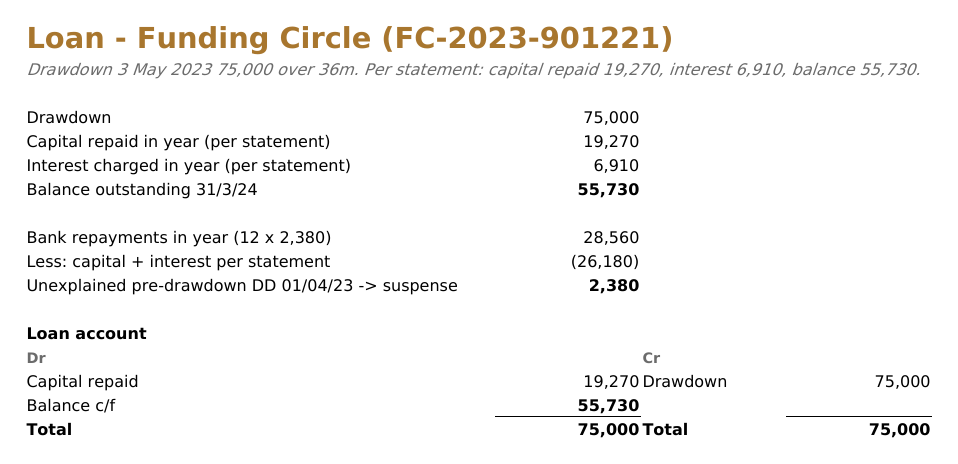
PrepIQ loan and finance reconciliation
05 · Loans & finance

Tied to the paperwork.

To the penny, interest and capital split.
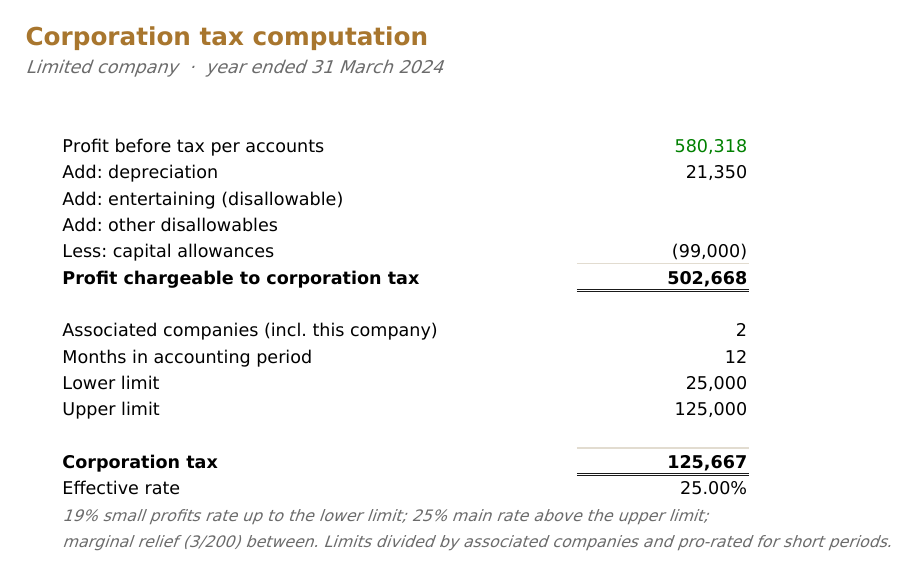
PrepIQ corporation tax computation
06 · Tax computation

Profit to tax.

Add-backs, allowances, marginal relief.
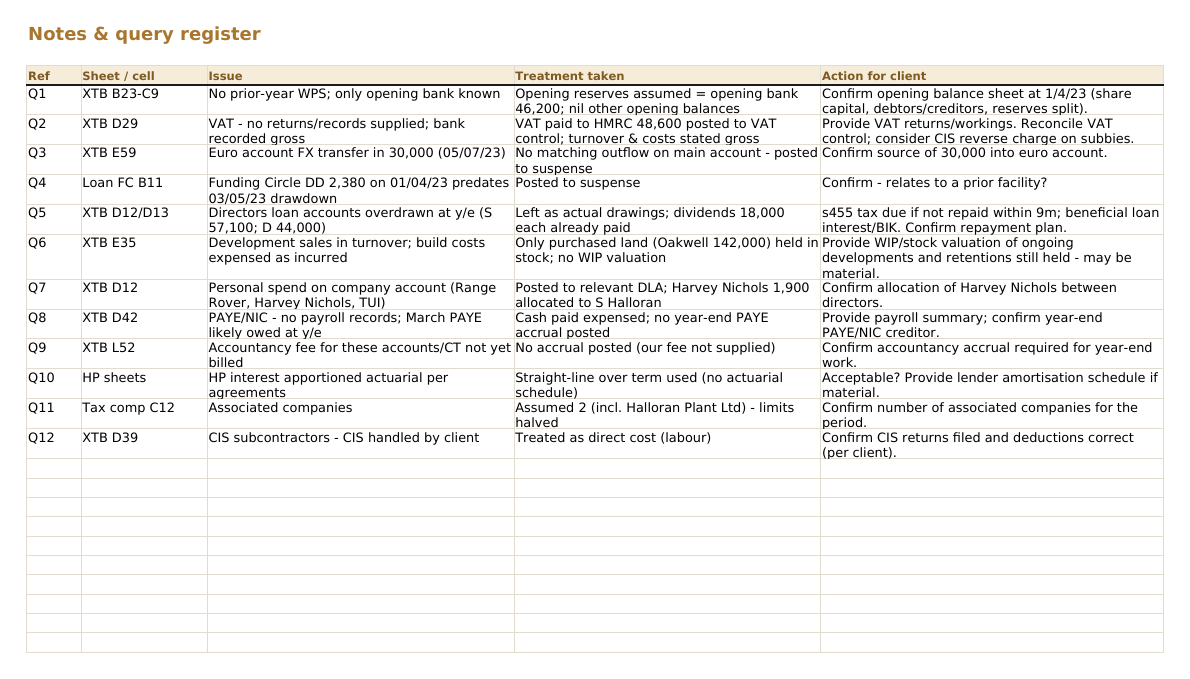
PrepIQ notes and queries for accountant review
07 · Notes & queries

Every judgement, flagged.

Where records fall short, it says so.
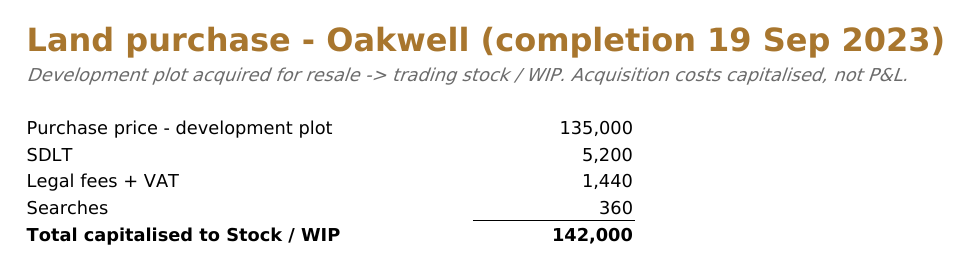
PrepIQ completion statement reconciliation
08 · Completion statement

Reconciled line by line.

Broken out, posted, traceable to source.

Prepared by PrepIQ · reviewed and signed off by the accountant

§ 03 · Built for review

It flags like
your best senior.

01

Cross-checks the sources

Cashbook, agreements, correspondence — read together, clashes flagged.

02

Catches incompleteness

A recurring item appearing once means the records are short. It says so.

03

Refuses to fabricate

Posts only what is evidenced. Gaps shown, never plugged.

04

Drafts the client queries

Open questions become a ready-to-send client email.

It flags like a senior — not a guarantee it catches every error. Your review is the final word.

RiQ Review notes · hartley-joinery-ye25 3 flags
Flagged

HP agreement missing the final payment schedule. Drafted a client query for the closing figure.

Records gap

Fuel recurs monthly; October is missing. Marked TBC — nothing posted.

Your call

£6,000 to the director — dividend or DLA? Left unposted; both treatments noted.

client-email.txt — query email drafted, awaiting your edit
In beta testing we fed it deliberately broken records. It flagged the client's errors — and the ones we planted.
§ From PrepIQ's own test programme
§ 04 · Entities

Sole trader, or limited company.

The right template and rules per entity.

For · sole traders

Self-assessment, right.

  • Trade, property and savings split
  • Capital and drawings handled
  • Private-use restrictions applied
  • Equity rolled into capital
For · limited companies

Corporation tax, posted.

  • Corporation tax computed and posted
  • Directors' loan accounts, never merged
  • Dividends against reserves, queries raised
  • Reserves carried forward cleanly
§ 05 · Inputs

Any records.
Any platform.

No special export to produce — give it what the client already has.

01

GL exports

Xero, QuickBooks, Sage, Pandle, any CSV / Excel.

02

Bank statements

PDFs, scans and CSV.

03

Finance agreements

HP, loan, completion — one rec each.

04

Receipts & invoices

Scanned or photographed.

05

Prior-year papers

Closing becomes opening, proven to tie.

06

Your template

Your layout, preserved year to year.

Reads ledgers from XeroQuickBooksSagePandleFreeAgentany GL · CSV / Excel

Request early access.

§ 06 · Privacy

Private by default, yours to release.

Scoped to you. Cleared when the job is done.

Scoped

Scoped to you

Jobs isolated. Nothing shared across accounts.

Reviewed

Review before release

A finished set waits for your approval.

Removed

Removed when finished

Close the job; the documents are cleared down.

§ 07 · Native in IQ Books

PrepIQ has three siblings. They're all native in IQ Books.

IQ Books is the ledger PrepIQ prepares from — reconcile, code, analyse and prepare in one place, with nothing to connect. Every plan includes all four; each also runs standalone on the software you already have.

§ 08 · Common questions

Frequently asked.

Anything else, email [email protected].

What does PrepIQ actually produce?
A complete set in your firm's template — extended trial balance, fixed assets, capital allowances, finance recs, VAT, tax computation — every figure a live cell link.
Sole traders and limited companies?
Yes — self-assessment splits for sole traders; DLAs, dividends, reserves and corporation tax for companies.
Does it roll last year forward?
Yes. Last year's closing balances become this year's openings, proven to tie. No prior file, the client starts at nil.
Do I still review the work?
Always. Every judgement is flagged and nothing releases until you approve it. Send follow-ups and it revises the same set.
What records does it need?
A ledger export from any platform, plus the paperwork — bank statements, agreements, receipts. No special format.
How do I get access?
PrepIQ is in private beta for practices. Request early access and we will be in touch. One IQ Suite subscription covers all four products.
What is PrepIQ?
Year-end working papers and accounts production software for UK accountants. Give it a client's ledger and paperwork and RiQ prepares the full set — extended trial balance, fixed assets, capital allowances, finance recs, VAT and the tax computation — every figure cell-linked and tied out, ready for your review.
How is PrepIQ different from accounts production software like Iris, TaxCalc or Capium?
Traditional accounts production software gives you templates to fill in. PrepIQ prepares the working papers themselves from raw records, then hands the finished set to you to review. It works from any platform's records.
§ 09 · Early access

In private beta
for practices.

Private beta access. One subscription, the whole IQ Suite.

Request early access Private beta · UK practices

What you get

  • The full set, your template
  • Sole trader and limited company
  • Every figure cell-linked, tied out
  • Released only on your sign-off

See the full feature tour →

Before the year-end set

Clean books first.
Then the papers.

CodeIQ, the AI bookkeeper, codes and cleans the ledger first — minutes per client.

  • Codes and VAT-classifies the ledger
  • Matches invoices, detects transfers
  • Posts to QuickBooks, Xero, Sage and Pandle
Explore CodeIQ · included in the suite →
SHELL → Motor Expenses97%
ADOBE → Software91%
STRIPE → Sales94%
HMRC → PAYE88%
clean books, ready to prepare
One subscription · four products · one RiQ
After the year-end set

Papers prepared.
Now advise.

LedgerIQ turns the same ledger into board-ready analysis. RiQ writes the commentary.

  • 40+ modules: DuPont, Z-Score, CVP and more
  • Established formulae, no black-box guesswork
  • One-click board packs and Excel exports
Explore LedgerIQ · included in the suite →
2.4×Current
18.2%ROE
A+Z-Score
38dDSO
£412KQ1 rev
3 flagAnomaly
40+ modules

Give RiQ the records.
Get back the papers.

The preparation, done. Your time goes on the review and the advice. All four IQ tools are native in IQ Books — or standalone on the software you run now.
Request early access See the feature tour Private beta · data cleared when the job is done

The platform behind PrepIQ

Year-end is easier when the books keep themselves.

PrepIQ builds year-end working papers from a client's ledger. Inside IQ Books that ledger is already coded, reconciled and current all year — so year-end starts from clean books, not a scramble.

Keep clients in IQ Books and PrepIQ works from a ledger that was ready the whole time — bring the back-history over in one connection.